Showing posts with label technology. Show all posts

Saturday, September 19, 2009

up the chic, baby

i have to admit something...i know bluetooth headsets are necessary, but they are typically ugly!!!
hubs has a few sets...one in particular, that i absolutely loathe!

but, well, apparently, i'm not the only one that thinks headsets are geeky...and unfashionable.

the cover of wired magazine this month has brad pitt {eye candy} sporting a headset...well, just look for yourself:
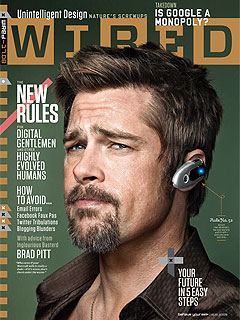
it says: "Rule No. 52 Ditch the headset. He can barely pull it off- and you are not him."

but the reality is that they are necessary and legally necessary in some areas, so well, if you have to sport one, why not find a cute one, right?!

this is the jawbone prime from aliph...the jawbone earcandy is super fun and full of summer colors...and well, bluetooth too, so why not?
got an extra $50k sitting around? well, do i have the headset for you. plantronics has the standard for much less, but this one is maxxed out wtih gold and diamonds...it was set for auction to raise money for the elle charities.
so for the normal people, here's a great option from fancy matters on etsy for a mere $73! it's full of sparkle and cute...

be safe...wear the headset...but do it in style. i'm off to find a bedazzler!

danyele @ a thorn among roses
post signature

Saturday, March 21, 2009

scrubbing your hard drive...

old technolgy is a killer!!!
especially when your computer/laptop is screaming a fatal error or just won't boot up...

...but don't just toss the whole thing in the trash. protect you and your information that resides on the hard drive first.

unfortunately, it's not quite as easy as just deleting all the contents on a hard drive...because there are folks who can read what they want from the remaining fragments that remain...and well, that's not good.


so you basically have two choices: smash the hard drive with a hammer and trash it. or, you can scrub your hard drive...and it's really easier than scrubbing a toilet...way less messy.

the esaiset and best way to to that is to use a program that overwrites the entire drive several times with unreadable gibberish.

here are a few freebies you can try:
summit computer's free Hard Disk Scrubber 2
PCW's active@ kill disk hard drive eraser

and when you're done scrubbing that hard drive...don't just trash the computer, recycle it! the EPA estimates recycling 1 million desktop computers prevents the release of greenhouse gases equivalent to the annual emissions of over 17,000 passenger cars.

so recycle that old computer...don't know where to go. well, lucky for you, i have a linky HERE!

post signature

Thursday, March 19, 2009

techie gifts, jewelry and repurposing

every woman, techie or not, needs some fab jewelry or gifts fo themselves or others...and i've found some pretty fun stuff out there...

geeks are kinda hard to buy for...you can't always "afford" their gadgets, so why not get something fun and useful at the same time!

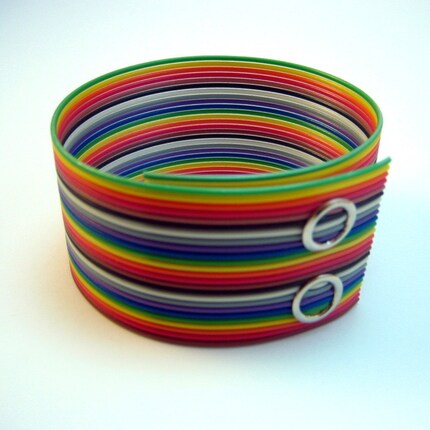
scrap ribbon cable that is repurposed as a bracelet...{digi Bling}

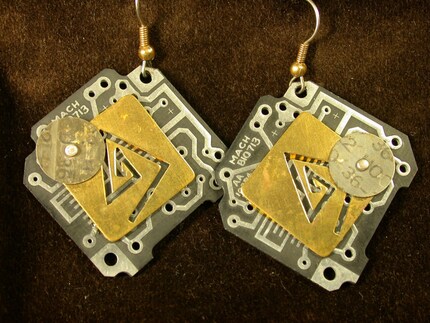
or some super fab earrings made from recycled circuit boards from debby arem designs on etsy...
how about some HTML earrings...from gearlog.

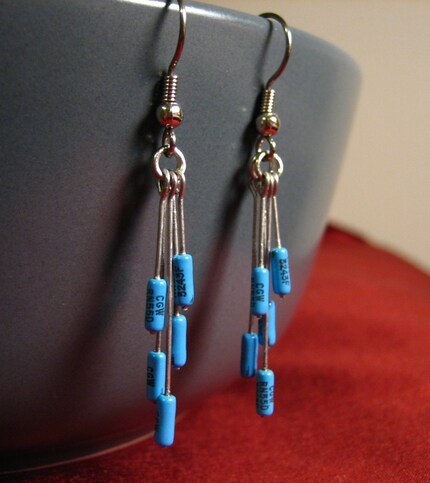
blue resistor earrings from digi Bling on etsy...
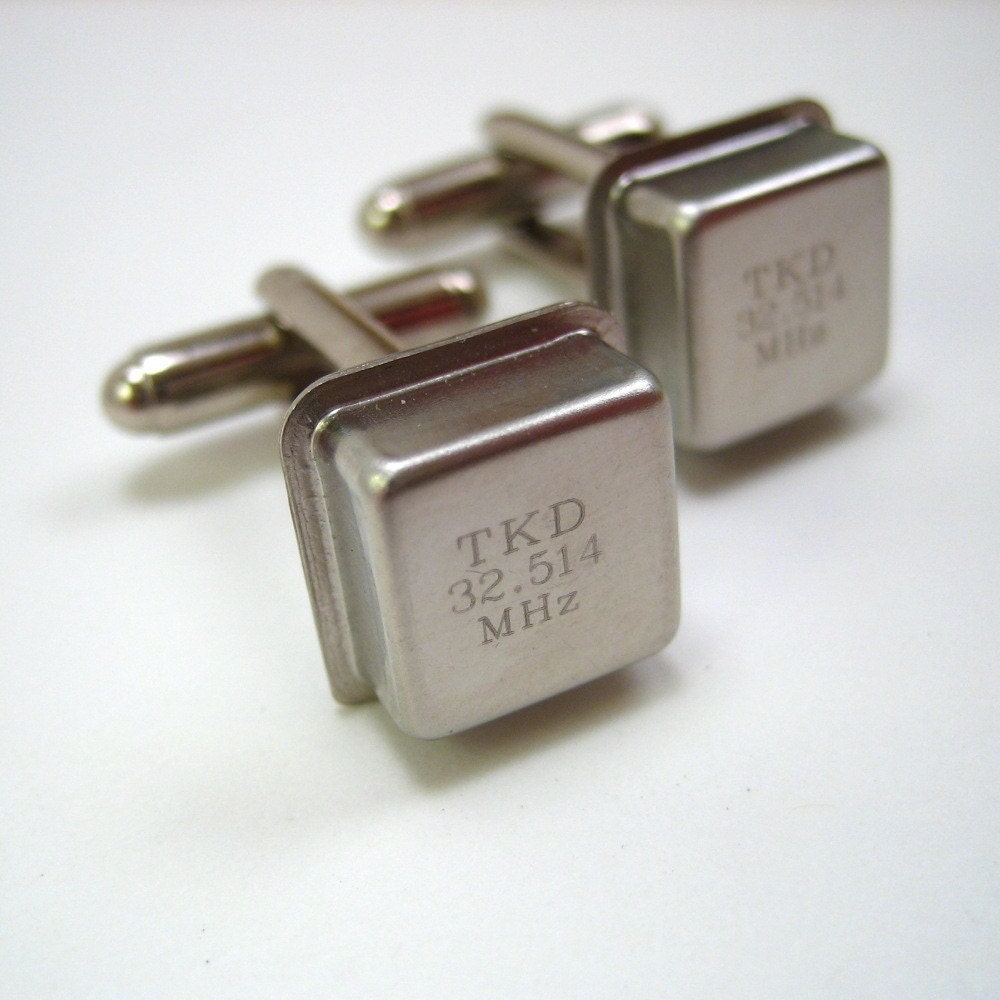
cuff links for the geek boy...made with oscillators also from {digi Bling}.

or the infamous computer micro tie tack {digi Bling}

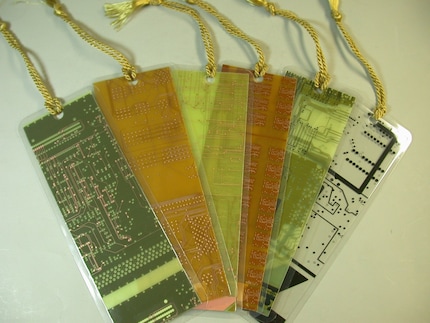
how about a super fun little recycled circuit board bookmarks from debby arem designs on etsy


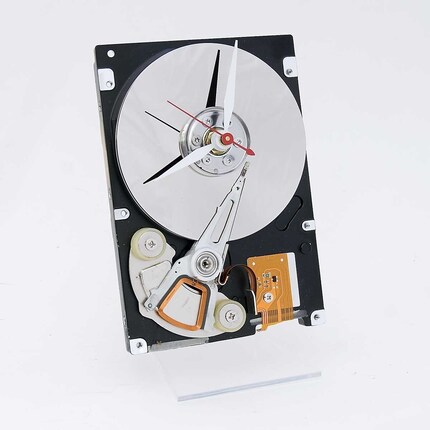
a nice clock for the geeky hubs office...made from an old hard drive {it's even green friendly...and not in your house} on etsy at pixel this

remember...recycling is only one way to help out. repurposing is another! get your thinking caps on and see what you can repurpose!

danyele @ a thorn among roses

post signature

Saturday, February 28, 2009

digital tv?

remember all the hype and commercials about you needing a digital TV or an aftermarket set top box by february 19th or you won't be able to watch tv???

in shock of all shocks, the house has approved a delay and the new implementation date is june 12. the bill heads to president obama who is called for the delay since the government doesn't have the funds for the $40 coupon to buy a new converter box.

so what's the real reason we are moving to all digi broadcasts and losing over the air???

simple...really it is! the over the air (rabbit ears) tv transmission is sent in the radio spectrum. and that big space is getting crowded with lot of transmissions of things like wireless phone signals, tv signals, radio signals and satellite transmissions. so it's getting crowded and if we get the over air tv off of it, there's more use for things like police, fire and emergency radio radio transmissions. and to boot, the picture and sound is way better, because it contains more data and is way more efficient that analog (that would be the old school tv way).

so if you have a tv and you aren't sure whether it's digital or not, the easiest thing to do is look for a label that says something like “Integrated Digital Tuner,” “Digital Tuner Built-In,” “Digital Receiver,” or “Digital Tuner,” “DTV,” “ATSC,” or “HDTV".

if you have a set that says “Digital Monitor” or “HDTV Monitor,” or as “Digital Ready” or “HDTV Ready,” it doesn't mean it contains the actual digital tuner...it means it's ready to receive a digital signal form an outer source. {i know, stinking marketing}

no more rabbit ears...and if you are still watching tv like that, we should talk tech talk! i'm just saying!

post signature

can i hear an amen?


how many cell phones do you have at your house?

and how many different cell phone chargers? yep, that's what i thought. it's nuts! but guess what the cellular industry is doing a consortium of sorts to standardize all cell phone chargers by the year 2012. not only would each charger use a standard USB interface, but the chargers themselves will also be up to 50% more energy efficient than those of today.

so, in short...it's gonna be easier and cheaper to charge your cell!

now, can i hear that amen???

post signature

Saturday, February 21, 2009

spicy blog


ever wonder how some people have something other than "comment" to click on for their bloggy friends to leave some love? well, it's time for you to become one of the cool kids!!

if you are a blogspot blogger, hit the orange B on the top left corner of your blog page. head on over to the third little clicky, to "settings". once inside the setting menu, select "comments" tab.

hang on...we are almost done already. grab some gatorade and refresh. {ready??}

scroll down to near the bottom of the page and there is a section titled "comment form message". there will be an empty box next to it...

get all creative and inspired and type in the box what you'd like for your "comment" to say. ours here says, "what did you think? leave us your comment!"

hit save {orange button at the bottom} and then go check out your spicy blog to see how it looks! yeah!!!!

post signature

pretty wii accessories


me and my clan love the wii...and now, there's another reason to celebrate.

accessories! every woman needs great accessories!

Logic3 recently release the FunChuk in 6 hot and spicy colors that are more than useful...they are CUTE!!

$20 is the going price...and Logic3's FunChuks can be found soon at your local gaming retailer.

if you more geeky details, go head on over to here.

post signature

Monday, February 16, 2009

your old cell phone: what you need to know before you toss it


in our face paced society, loaded with awesome technology, sometimes it's good to stop and think about what happens to the data {your personal stuff} in the technology.

according to switched.com, 99% of recycled cell phones still hold sensitive data.

sensitive data like your name and address, your kids pictures, schools, doctors names, text messages, personal info...and none of us want that out there for the the not-so-nice people to get a hold of.

if you are anything like this household, we have had a few cell phones in our time. when contracts are up, we get new ones. so, before you donate, sell, or throw away your cell phones or laptops or computers, clear your private information!

here's a few quick tips on how to save your data while still protecting your info on your old cell phones:

1. backup all your data so you have a copy in case you forgot to get it all off before getting rid of the device. {plug into the computer via the cable provided and copy the data on your computer}

2. format your cell phone...in techie terms that means wiping the slate clean and clearing all the data.
  • format by holding down the power button and using a pointy object {pen, paper clip} to press the restore button. {the button will be a tiny little rubbery "hole"}
  • so this will erase all your info and data on your phone. and be patient, it will take about five to seven minutes. Once the phone has been formatted it will shut down and restart
3. Turn on your cell and do what the phone says to reinstall the FACTORY settings on the phone.

now that your info is wiped clean and you are safe, go donate those old cell phones. here's a few places that would love to put them to use...and not as paper weights in the junk drawer:
cell phones for soldiers
national coalition against domestic violence
phones for life for senior citizens

no place near you for donating?? mail it.
that's not your bag? you still need to recycle it!

did you know that tossed cell phones account for nearly 65,000 tons of toxic waste each year. each discarded cell phone can pollute up to 132,000 liters of water.

whatever you do, don't get rid of that cell phone until your info is cleared out!

wanna see a little more of my clan...head on over to a thorn among roses.

post signature

Saturday, February 7, 2009

you might need a GPS homing device if...

you might need this GPS homing device if you get lost in the mall parking lot and can't find your car.

you might need this GPS homing device if you only make it home from your friend's house by reciting, "left, right, right, left."

you might need this GPS homing device if you are a hopelessly lost driver who just can't seem to find your way around.


this is basic stuff...no fancy smancy stuff here.

so i'm at my car and i need to remember where it is {goofy aisle 354}. i just a push a button and this thingy remembers my current location. when i want to go back to where i pushed the button on the thingy, it tells me how to get there, and it does it with a directional arrow. {hello goofy aisle 354}

and it's all yours for $79.95 from Hammacher Schlemmer.

no menus.
no addresses.
no fancy voice.
no keyboard.
{if you lose your car keys too often, i do suggest using the lanyard option}


but, it could be just want you need...or it could be something you don't. but it's still fun!

stay a while and look around...you'll find some good stuff!
wanna see more of me and my clan...stop by a thorn among roses.

techie strikethrough

i got a great question from mandi on how to add a strikethrough line in a word on your blog. so thanks to mandi...you get the answer too! yeah for you!
come on...you are smart enough! i promise!
have any more techie questions? let me know!

iLife 09/iPhoto for Mac users

Apple has recently released it's upgrade to the iLife suite, which include, iPhoto, gargae band, iWeb, iDVD and iMovie. current Mac users of iLife can upgrade for $79...so how does it rate?

well, i'm a total Mac girlie...love it. i love iPhoto...it's easy to store your pics and it has fab on-the-fly photo editing capabilities. i love it for quick photoshop like edits...now you know my secret. {when i do senior pictures, i use PS, but can do really quick "show the pics to mom" edits on iPhoto}

i am going to admit, i don't use iMovie...hubs does...not a big deal for me. i don't use garage band...bc it doesn't matter to me...and we use iDVD, but any upgrades to me are just cake!

but i love iPhoto. a lot. and iLife 09 has some fab updates to iPhoto that make me want to jump up and shout! first, iPhoto now has the ability to detect faces {face recognition} and identify them in your photos.


SHUT UP!

there's more: it can also identify and map the location where the pics were shot {geo tagging, seriously, using GPS data from your iphone};
apple in it's fab wisdom has put together a guided tour here...go check it out! for now, here's a screen shot...and, u bloggers are going to love this...it can directly post sets of photos to several popular online services like facebook and flickr...and it syncs with them too! literally as easy a a click of the mouse. see it live here.

{if would like to read more about garage band and iMovie improvements and a review, please look here.}

well, i'm off to get the new upgrade...if hubs hasn't already!
look for a follow up post on "my iLife 09 experience" soon here at project{create a home}

and don't forget to scroll on down to see more fun stuff to do with your own home!!
wanna see more of me and my geekiness...i'm at a thorn among roses.

Saturday, January 31, 2009

ECO--font??

even the fonts on our computers have gone green...well at least at eco font.

here are many things we can do to save our printer's ink like using unbleached paper, an efficient printer, and printing only when necessary, but SPRANQ developed one more alternative called the Ecofont. The Dutch company says their new font design uses up to 20 percent less ink.


well, here's how it's done...the big secret is in the font design. see how there are dots in each letter? well, the font is modeled after swiss cheese {who's hungry}. the crazy techies there evaluated the best way to preserve ink and after shooting down zebra striped fonts and super thin letters, the "holey" font is the best fit to make it legible and still handsome!

Ecofont is compatible with Mac OSX, Windows, and Linux. You can download the font for free over at Ecofont

it's free and you'll save upto 20% of ink in your printer cartridges...and that, my friends, is cold, hard cash in your pocket!!! and hey, it helps save the planet too!

keep on looking around for other fab things here at PCAH...and come visit me anytime over at a thorn among roses.

make your own blog button

i think it's time to do a quick and easy version of "make your own blog button"...

you need just a few simple things to get started:
a picture or words/a jpg image that you want to be the button
a photo sharing site account like flickr or photobucket
access to the blog layout

i used Photoshop Elements to create the PCAH button you see below.

if you don't have access to PSE or PS, you can quite easily upload a pic to any free site, i like picnik, and do some quick mods and add text for a button full of love. the only thing you need to make sure of is that the size of your graphic is about 200 x 200 px, otherwise it will not fit in the sidebar of most common blog formats.

once you have that complete, head on over to your free photosharing site...i use photobucket, but you can use what you like. upload your picture and get the URL noted for that picture after the upload.

now, let's put the button up on the blog for you...

head over to your blog and go to the dashboard. enter layout and you will see the "box version" of what your blog looks like.

select "add a gadget" in the column you would like to add your button. a seperate big window will pop up. select HMTL/JavaScript by finding it on the list and selecting the "+".
another window pops up for you to enter the code...now, relax...take a deep breath...this is not hard. it just looks funny!


you will want to have the copy of your URL for your blog and your direct link to your photo then enter the following:

all of it put together looks like this for our button here (no spaces and make sure to put in the quotation marks as noted):


now move that new fab button of yours around to wherever you think it looks best! you did it! and if you seem to run into a problem here or there, let me know and i'll see if i can figure it out!

next week, i'll be teaching you all how to add the fab little scroll box with your actual code on your blog (take a deep breath, it will be fine). that way, everyone else can post your little button anywhere on their blog too!!! stay tuned!

do you have any techy stuff you want to know about? send me a msg...djehaus@gmail.com


and, come stop and see me and my roses (and one thorn) any time at a thorn among roses!

wii fit...and finding one

i asked for two things this christmas...
a wii fit
a new cell phone case

well, one out of two isn't bad! anyway, i have been in search ever since for a wii fit. every store on this planet that has the wii fit, is def out of stock! i have been stalking bestbuy.com and going to the aisle at target incessantly to get my wii fit.

finally, i found the easy route...it's called wii fit tracker. i watched the site for only a few hours and found that amazon.com had 10 wii fit's in stock...i logged into my amazon account, dumped that little wii fit baby into my shopping cart...and hit checkout. in 10 seconds, i was buying the last wii fit in stock. {i think they may have add the wii fit buying experience to the next olympic games}

$89 with free supersaver shipping...and it's delivered to my door so i don't have to deal with all the stinking snow on the ground. {if you don't have snow...well, i'm jealous}

so if you are still dreaming of a wii fit, go on over and check out wii fit tracker.

then, get your hula hooping self on the board and get wii fit!
check out more of my crazy clan over at a thorn among roses!

scroll on down and see what other fab girlies have to say here at project{create a home}